
Claude Skills for Recruiters: 5 Ready-to-Use Workflows / Skills
You can download all five skills here: Claude Skills for Recruiters
We recently hosted a live workshop where we walked a group of 45 recruiters through building Claude Cowork skills for their day-to-day workflows. The biggest takeaway from the session wasn't any single skill. It was the concept itself: instead of pasting the same prompts into Claude every time, you can save a workflow as a Skill, run it with one command, and even schedule it to happen automatically.
Most recruiters we talked to were already using Claude or ChatGPT for one-off tasks like rewriting outreach messages or summarizing notes. But they hadn't made the leap from "chatbot I paste things into" to "system that runs workflows for me." That's the gap these skills are meant to close. This shift is part of a bigger recruitment trend we’re seeing: recruiters becoming Talent Engineers — people who design and automate their workflows. (We break that down more here → What Is a Talent Engineer).
Below are five skills we've built and tested. Each one targets a specific workflow that search firms do repeatedly. You can use them as-is or modify them to fit how your firm operates. They're meant to be starting points, not finished products. If you would rather build one from scratch, here are two example prompts to help you.
Note: some of the skills require you to have an Exa.ai account. Exa is an AI-native search engine built for machines to use. It indexes over a billion profiles and companies across the web. Get a free account to test it, and add Exa as a connector in Claude. If you don't want to use Exa, ask Claude to remove Exa as a research step in the skills.
The Skills
1. Client Meeting Prep
(client-meeting-prep.skill)
This one checks your Google Calendar for upcoming client meetings, identifies who you're meeting with, and runs a full research brief using Exa (a web research tool). It pulls their LinkedIn background, recent news, company overview, what they're actively hiring for, competitive landscape, and talent market context for their industry. The output is a one-page brief you can scan in five minutes before the call.
The real value here is scheduling it. Set it to run every morning in Claude Cowork, and you'll have a brief waiting in your Slack or Email before your first meeting. You go from spending 20 minutes Googling before a call to spending zero.
Requires to add Exa as a connector in Claude.
2. Candidate Write-Up
(candidate-writeup.skill)
Takes a candidate's name (or LinkedIn URL), the role they're being considered for, and the client company. Then it use Exa to research the candidate across multiple sources: career history, recent activity, prior company context (funding, exits, scale), and compensation benchmarks. The output is a formatted write-up ready to send to your client.
This came up repeatedly in our pre-workshop survey. Recruiters spend 15-20 minutes after every screen writing up candidates for clients. The skill gets you a solid first draft in about 30 seconds. You review it, make a few edits, and send it. On the call, one attendee mentioned they'd already built something similar using Metaview transcripts piped into Claude, then auto-delivered to Slack and their ATS.
3. Competitive Landscape
(competitive-landscape.skill)
Give it a company name and it maps out who competes with them. It runs parallel searches across multiple angles (direct competitors, companies at a similar funding stage, alternatives, category searches) and produces a curated table of 8-15 companies with descriptions, estimated size, funding stage, and HQ location. It also exports a tab-separated file you can paste into Google Sheets.
Useful for intake prep, business development targeting, or just understanding a client's market before a kickoff call. It's the kind of research that takes 30-45 minutes manually and about 2 minutes with the skill.
4. Job Calibration Research
(job-calibration-research.skill)
This is the most complex skill and the one we spent the most time on in the workshop. You give it an intake call transcript (from Fireflies, Metaview, or a Google Doc) and it produces a full calibration brief: extracted must-haves from the conversation, a sourcing company list (competitors plus talent peer companies), external candidates found through Exa, and optionally internal candidates from your ATS. We set it up using Stardex as an ATS.
The idea is to go from "we just had the intake call" to "here's the first calibration brief" in about 3 minutes instead of an hour. It's not a replacement for the recruiter's judgment. It's the first pass that gets you oriented so you can start making calls instead of making spreadsheets.
If you have an ATS with an MCP server or API (like Stardex), it can also search your internal database in parallel with the external search. If not, just remove that step from the skill and it works fine with only Exa.
5. Daily Candidate Interview Brief
(daily-past-candidate-interview-brief.skill)
A scheduled task that runs every morning. It checks your ATS for candidates who had interviews or updates in the last 48 hours, pulls the notes and pipeline stage, and gives you a prioritized summary of what needs attention. Think of it as your morning action list: who needs follow-up, who's gone dark, where there's a competing offer or timeline risk.
This one requires ATS connectivity, so it's more dependent on your specific setup. We demoed it with Stardex, but the concept works with any system Claude can talk to. If your ATS has an MCP server, you can connect it as a custom connector in Claude. If it has an API, you can point Claude Code at the docs and get a basic integration running.
How to get started
1) You can use these skills as a starting point. To add them, go to claude.ai/customize/skills and click + Create Skill → Upload a skill.
2) Download the zip file here, and unzip it - https://drive.google.com/uc?export=download&id=1nqx97qlHB9FPazvej5ssu5N6W93m5KX7
3) Pick the skill that you want to add. You should be all set.
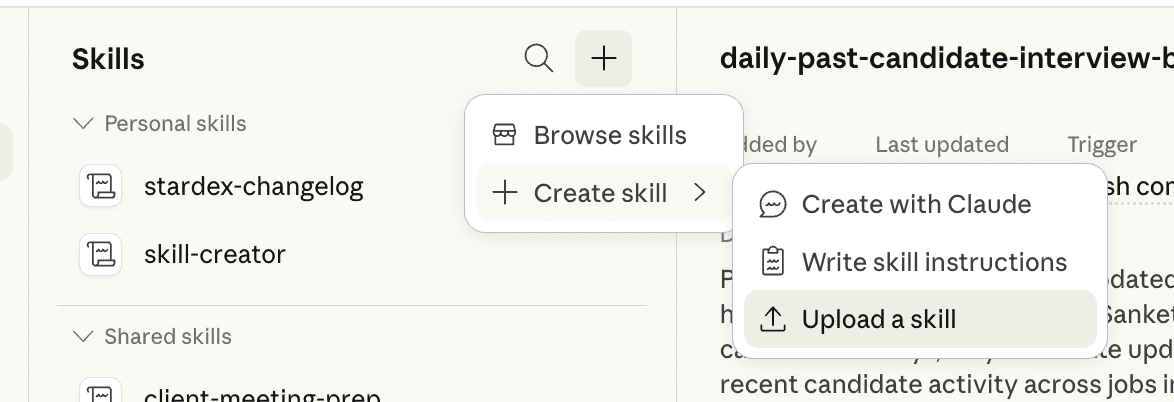
Once uploaded, I'd recommend opening each skill and editing it to match how your firm actually works. Change the meeting title format to match your calendar. Adjust the write-up template to match what your clients expect. Swap the ATS references for whatever system you use. The prompts are just text files. You can read them, modify them, and make them yours.
Need Help Setting Up Claude Skills for Recruiters?
We'll keep adding more skills to this page as we build them. If you have ideas for workflows you'd want automated or want help setting any of this up, reach out to us at support@stardex.ai
Thinking about switching your ATS? Here’s what an ATS that works with Claude AI looks like in practice.
Here’s the full demo video of these Claude skills for recruiters, so you can see exactly how each workflow is set up and used from start to finish.


